When most people think about home security cameras, they imagine something aggressive-looking mounted on a wall with flashing lights and bulky hardware.
But the Aqara Camera Hub G3 — and especially the newer G350 direction Aqara is pushing toward — feels completely different.
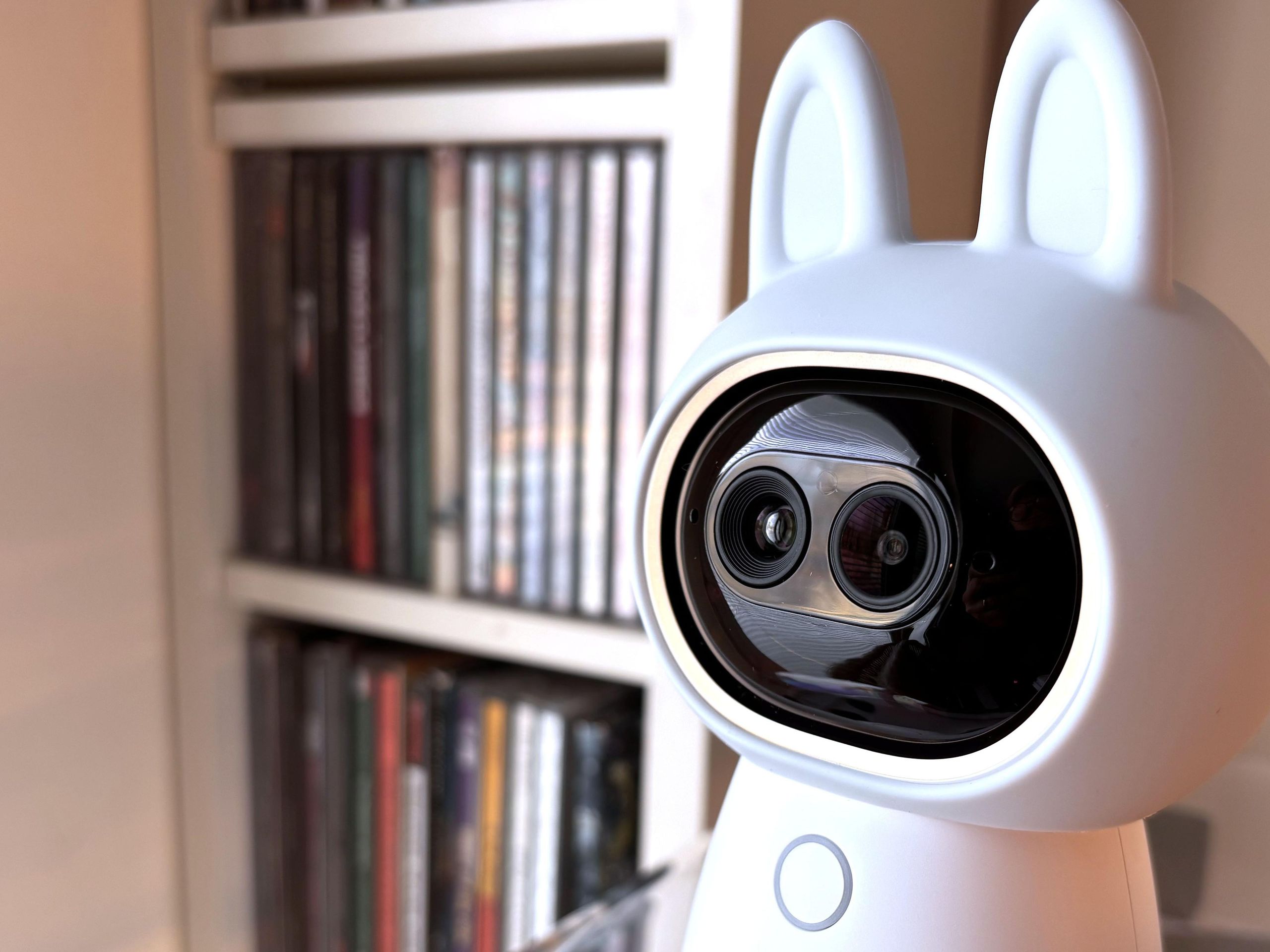
At first glance, it honestly looks more like a toy robot sitting on a desk than a serious security device.
But once you start using it, you quickly realize this thing is packed with surprisingly advanced smart home and security features.
From AI facial recognition to smart home automation and sharp video quality, the Aqara Camera Hub series is trying to become much more than just another indoor camera.
So, is the Aqara G350 actually worth buying?
Let’s break everything down.
Design and Build Quality
Small, Cute… And Surprisingly Smart Looking
The first thing most people notice is the design.


5
Unlike traditional security cameras, the Aqara Camera Hub looks playful.
It has:
- Rounded edges
- Compact body
- Rotating camera head
- Minimalist smart home style
Honestly, if you saw it sitting in a living room, you might mistake it for a small smart assistant device rather than a serious surveillance camera.
But that soft design is actually part of its strength.
It blends naturally into homes without making your space feel like a prison surveillance room.
Build Quality Feels Better Than Expected
Even though it looks lightweight and playful, the build quality is solid.
The camera feels well assembled with:
- Strong rotating motor
- Durable plastic housing
- Stable base
- Smooth movement controls
For a compact smart home device, it feels premium enough for the price category.
Video Quality and Security Performance
This is where the Aqara Camera Hub starts becoming impressive.


6
Sharp Indoor Video Quality
The camera delivers detailed footage with:
- Clear daytime recording
- Good indoor color accuracy
- Wide viewing angles
- Decent low-light performance
Night vision is also surprisingly effective for an indoor-focused camera.
Faces and movement remain visible even in darker environments.
AI Tracking and Motion Detection
This is one of the biggest selling points.
The Aqara Camera Hub can intelligently track movement using AI-powered detection.
Features include:
- Human detection
- Face recognition
- Pet tracking
- Motion alerts
- Gesture controls
When someone walks into a room, the camera can automatically rotate and follow movement in real time.
That makes it feel much smarter than many budget indoor cameras.
Smart Home Integration
This is where Aqara becomes very different from ordinary security cameras.
The G350-style ecosystem isn’t just about video recording.
It’s designed to become a smart home control center.


6
Works With Multiple Smart Platforms
The Aqara Camera Hub supports:
- Apple HomeKit
- Google Assistant
- Amazon Alexa
- Aqara smart devices
- Matter ecosystem support
That means you can connect:
- Door sensors
- Motion sensors
- Smart locks
- Smart switches
- Curtains
- Lights
And automate everything together.
For example:
- Lights turn on when motion is detected
- Camera records when doors open
- Alarm triggers automatically at night
This makes the Aqara system feel much more advanced than standalone cameras.
Rotation and Viewing Angles
One thing people love about the Aqara Camera Hub is the motorized movement.


6
The camera can:
- Pan horizontally
- Tilt vertically
- Follow subjects automatically
- Cover wider room areas
Instead of needing multiple fixed cameras, one Aqara unit can monitor a large portion of a room.
The movement is smooth and relatively quiet.
Privacy Features
This is actually one of the smartest parts of the design.
Many people worry about smart cameras constantly watching them.
Aqara tried to address this by adding privacy-focused features.
Physical Privacy Mode
The camera can physically rotate downward when privacy mode is enabled.
That means:
- Lens points away
- Recording stops
- Visual confirmation is obvious
This feels much more trustworthy than simply relying on software alone.
Audio Quality and Communication
The built-in microphone and speaker system works well for everyday indoor communication.
Features include:
- Two-way audio
- Remote communication
- Voice interaction
- Real-time listening
You can:
- Talk to family members
- Check on pets
- Communicate remotely
- Respond to visitors indoors
Audio clarity is decent for a smart camera in this category.
Aqara Camera Hub G350 Specs
| Feature | Details |
|---|---|
| Camera Type | Indoor smart security camera |
| Motion | Pan and tilt rotation |
| AI Features | Facial recognition, tracking |
| Smart Home Support | HomeKit, Alexa, Google Assistant |
| Audio | Two-way communication |
| Night Vision | Supported |
| Automation | Smart home hub integration |
| Connectivity | Wi-Fi |
| Privacy Mode | Physical lens hiding |
Real-World Everyday Experience
This is where the Aqara Camera Hub becomes surprisingly enjoyable to use.
Unlike many security cameras that feel cold and technical, this one feels more interactive and smart-home friendly.
Where It Performs Best
- Indoor monitoring
- Smart apartments
- Family homes
- Pet monitoring
- Baby room monitoring
- Home automation setups
Where It Still Has Limitations
- Mostly designed for indoor use
- Advanced features may require ecosystem setup
- Some smart features work best inside Aqara ecosystem
- Cloud features vary by region
Still, for most users wanting an intelligent indoor camera, it performs well above expectations.
Pros and Cons
✅ Pros
- Cute but premium design
- Strong AI tracking features
- Excellent smart home integration
- Smooth pan and tilt movement
- Reliable indoor monitoring
- Physical privacy mode
- Good automation support
❌ Cons
- Mostly indoor-focused
- Some advanced features require setup knowledge
- Cloud storage limitations in some regions
- Not the cheapest smart camera available
Aqara vs Ring vs Eufy
Compared to Ring:
Aqara:
- Better smart home automation
- More playful design
- Strong Apple HomeKit support
Ring:
- Better outdoor ecosystem
- More mainstream security focus
Compared to Eufy:
Aqara:
- Better smart automation integration
- More advanced ecosystem possibilities
Eufy:
- Often simpler setup
- Strong local storage features
Who Should Buy The Aqara Camera Hub?
This camera is perfect for:
- Smart home enthusiasts
- Apartment owners
- Apple HomeKit users
- Families wanting indoor monitoring
- Users building automation systems
Not ideal for:
- Outdoor-only security needs
- Users wanting ultra-simple plug-and-play systems
- Buyers looking for the cheapest option possible
Pricing and Where To Buy
The Aqara Camera Hub usually sits in the mid-range smart home category depending on the version and region.
👉 Check availability here:
💡 Tip: Make sure you check compatibility with your preferred smart home ecosystem before buying.
FAQs
1. Is the Aqara Camera Hub good for home security?
Yes. It offers strong indoor monitoring, AI tracking, motion detection, and smart automation features.
2. Does the Aqara Camera Hub support Apple HomeKit?
Yes. HomeKit support is one of its strongest features.
3. Can the camera rotate automatically?
Yes. The pan and tilt motor allows automatic tracking and wider room coverage.
4. Is the Aqara Camera Hub wireless?
It connects through Wi-Fi, but power still requires a cable connection.
5. Can it detect pets and people separately?
Yes. AI detection helps identify movement types more intelligently.
6. Is the Aqara Camera Hub good for apartments?
Absolutely. Its compact design and smart features work especially well in smaller indoor spaces.
Final Verdict
The Aqara Camera Hub G350 may look playful and almost toy-like at first glance, but underneath that friendly design is a genuinely capable smart security camera.
It combines:
- Smart AI features
- Reliable indoor security
- Excellent smart home integration
- Privacy-focused controls
- Smooth camera tracking
And unlike many cold-looking security devices, it actually feels designed for modern living spaces.
It’s not trying to scare intruders with aggressive industrial design.
Instead, Aqara built something smarter, quieter, and far more integrated into everyday life.
For smart home users especially, this camera is much more serious than its cute appearance suggests.